Company

Salla inventory management

Sell Non-Stop: Accurately Manage Multi-Warehouse Inventory for Salla Branches

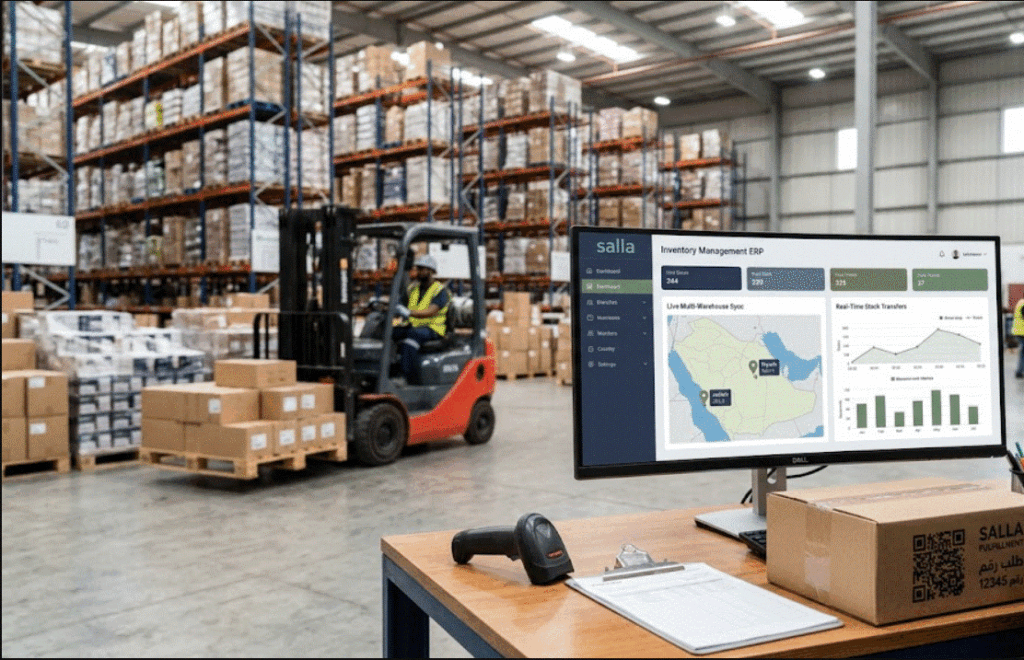
Watching a product go viral on your digital storefront is an exhilarating experience. However, the thrill of a massive sales spike is quickly shattered when you realize you have accidentally oversold a product you no longer have in stock. In the fast-paced world of modern E-commerce, managing inventory across multiple physical branches and distribution centers is a complex logistical puzzle. Relying on manual updates or basic, disconnected spreadsheets is a guaranteed way to bleed revenue and infuriate your customers. As your brand scales on Salla—the leading e-commerce platform in the region—your operational infrastructure must evolve. A robust Salla inventory management strategy is no longer a luxury; it is the fundamental core of your business survival. To sell non-stop without hitting operational roadblocks, your storefront must be deeply connected to a centralized system that orchestrates your multi-location logistics. In this comprehensive guide, we will explore the chaos of disconnected stock, how a seamless Salla ERP integration acts as your digital brain, the art of optimizing your Shipping routes, and how to keep your Suppliers perfectly aligned with your actual market demand. 1. The Multi-Warehouse Dilemma: Defeating the “Out of Stock” Nightmare When you first launch an online store, fulfilling orders from a single backroom or garage is manageable. However, as your enterprise expands into multiple retail branches, regional distribution hubs, and third-party logistics (3PL) centers, visibility becomes your greatest enemy. The Disconnected Data Trap If your Salla store does not know exactly what sits on the shelves of your Riyadh branch versus your Jeddah warehouse, you are operating blindly. A customer might see a dreaded Out of stock message on your website for a flagship product, completely unaware that there are 50 units sitting idle in a secondary branch location. You lose the sale not because you lacked the product, but because you lacked the visibility. Conversely, if stock is not updated instantaneously across all platforms, two customers might purchase the same final unit simultaneously—one online and one walking into your physical store. The resulting forced cancellation permanently damages your brand reputation. 2. Unifying Operations with Salla ERP Integration The ultimate solution to multi-warehouse chaos is bridging your customer-facing digital storefront with a backend Enterprise Resource Planning (ERP) system. The Real-Time Synchronization Engine A premium Salla ERP integration acts as the central nervous system of your retail empire. When integrated, your ERP consolidates the stock levels from every single physical location into one unified digital ledger. When a customer views an item on your Salla store, they are seeing the live, combined aggregate of your Warehouse inventory. The exact second an item is purchased—whether via a digital checkout or at a physical Point of Sale (POS) terminal in one of your branches—the ERP instantly deducts that item across the entire network. This bi-directional sync absolutely guarantees that you never double-sell a product and ensures that every available unit in your company is actively working to generate revenue. Disconnected Operations vs. Integrated Multi-Warehouse Management Operational Challenge Disconnected Salla Store Integrated ERP Multi-Warehouse System Stock Visibility Fragmented; relies on manual daily tallies. 100% unified, real-time visibility across all branches. Order Routing Manual allocation; high risk of human error. Automated routing to the warehouse closest to the customer. Inventory Accuracy High risk of phantom stock and overselling. Flawless accuracy; live deductions at the millisecond of sale. Store Replenishment Reactive; stores frequently run empty. Proactive; automated transfer alerts when branch stock dips. 3. Optimizing Shipping and Elevating Order Tracking Effective Salla inventory management goes beyond just knowing what you have; it dictates how quickly and cost-effectively you can deliver it to the consumer. Geolocation-Based Order Routing Operating multiple warehouses gives you a massive geographical advantage, provided your software is smart enough to use it. An advanced ERP utilizes intelligent routing logic. When a customer in Dammam places an order on your Salla store, the system automatically bypasses your main Riyadh warehouse and assigns the fulfillment ticket directly to your Eastern Province branch, assuming the item is in stock there. This localized fulfillment slashes your Shipping costs, drastically reduces delivery times, and turns your physical retail branches into hyper-efficient micro-fulfillment centers. Frictionless Customer Transparency Once the order is allocated to the correct warehouse, the fulfillment team uses barcode scanners to pick and pack the item, instantly generating a courier label. This triggers a seamless data loop back to the customer. The ERP pushes live updates to the Salla storefront, providing the buyer with highly accurate Order tracking details. This automated transparency reduces customer anxiety and virtually eliminates the barrage of “Where is my order?” inquiries to your support team. 4. Aligning Suppliers with Real-Time Market Demand Managing multi-location inventory is not just about pushing products out; it is equally about managing how products flow in. When you operate multiple branches, manual procurement is a guessing game that leads to massive overstocking or crippling shortages. An integrated cloud accounting and inventory ERP continuously analyzes your Warehouse inventory depletion rates across every individual location. Automated Reorder Points You can set specific minimum stock thresholds for each branch. When a high-selling item drops below this threshold in a specific location, the system automatically generates a draft Purchase Order (PO). It can either request an internal transfer from a larger central warehouse or automatically alert your external Suppliers to deliver fresh stock directly to the depleted branch. This data-driven approach keeps your cash flow fluid, ensuring capital is not trapped in dead stock while your best-sellers remain perpetually available. Key Metrics for Warehouse Inventory Optimization Key Performance Indicator (KPI) What It Measures Strategic Value for E-commerce Inventory Turnover Ratio How often inventory is sold and replaced over a period. Identifies fast-moving products to prioritize with Suppliers. Order Fill Rate Percentage of orders successfully fulfilled without backorders. Directly correlates with customer satisfaction and brand loyalty. Carrying Cost of Inventory The financial cost of storing unsold goods across branches. Highlights the necessity of liquidating dead stock to free up capital. Order to Ship Time Time elapsed between checkout and package dispatch.

Read more
WhatsApp Invoicing

WhatsApp Invoicing: 5 Reasons B2B Stores and Companies are Going Paperless

In the rapidly evolving landscape of corporate commerce within the Kingdom of Saudi Arabia, the methods by which businesses communicate, trade, and exchange documentation are undergoing a radical shift. The traditional image of a bustling accounting department—filled with stacks of paper, noisy printers, and couriers rushing to deliver physical documents to clients—is quickly becoming obsolete. In its place, a streamlined, highly efficient digital ecosystem is emerging. At the very forefront of this transformation is the adoption of WhatsApp Invoicing, a technological leap that is fundamentally altering how B2B (Business-to-Business) stores and corporate entities manage their financial communications. For decades, the standard procedure for billing a corporate client involved printing multiple copies of an invoice, signing them, stamping them with the company seal, and physically mailing them. Even the transition to standard email brought its own set of challenges, with invoices frequently getting lost in spam folders or ignored in overflowing corporate inboxes. Today, the modern solution lies in leveraging the world’s most widely used messaging application. By integrating enterprise resource planning (ERP) systems directly with instant messaging platforms, businesses are pioneering an era of Paperless billing KSA. This transition is not merely a superficial tech trend; it is a profound operational strategy. By sending B2B digital invoices directly to a client’s smartphone as clean, professional PDF documents, companies are reaping massive operational benefits. In this comprehensive guide, we will explore the five core reasons why adopting this integration is no longer optional, but an absolute necessity for businesses looking to dominate the modern market. We will delve deeply into how this practice eliminates waste, accelerates operations, and fortifies client relationships. Reason 1: Drastic Printing Costs Reduction (Saving Paper) The most immediate and tangible benefit of transitioning to a digital messaging delivery system is the absolute eradication of physical paper trails. In a standard B2B wholesale or manufacturing environment, a single transaction does not just generate one piece of paper. It generates a cascade of physical documents: the original invoice for the client, a duplicate for the finance department, a triplicate for the warehouse, and often additional delivery notes. When a company scales and processes hundreds or thousands of transactions monthly, the financial burden of this paper-based system becomes staggering. The costs are not limited merely to purchasing boxes of A4 paper. The hidden expenses include the exorbitant costs of printer ink and toner cartridges, the routine maintenance and repair of heavy-duty office printers, and the physical space required to store these documents. Archiving years of physical invoices requires buying filing cabinets and sometimes even renting dedicated storage rooms, which consumes valuable corporate real estate. By adopting WhatsApp Invoicing, a business completely bypasses this archaic physical infrastructure. The ERP system generates a flawless, high-resolution PDF document internally. With a single click, this document is securely transmitted to the client’s verified mobile number. There is no printing, no physical stamping, and no physical archiving required on the sender’s end. The digital file is stored safely in the cloud and rests comfortably in the client’s chat history. This fundamental shift plays a massive role in reducing operational costs for businesses, allowing financial directors to reallocate the printing and storage budget toward strategic growth initiatives. Financial and Operational Comparison: Paper vs. WhatsApp Invoicing Operational Metric Traditional Paper-Based Invoicing Digital WhatsApp Invoicing Material Costs High continuous expenses (Paper, Ink, Toner, Envelopes). Zero physical material costs. Storage Requirements Requires filing cabinets, binders, and physical archive rooms. Cloud-based internal storage and digital chat logs. Document Longevity Vulnerable to physical damage, fading ink, fire, or misplacement. Permanent digital PDF file, immune to physical degradation. Retrieval Speed Takes minutes or hours searching through physical archive folders. Found in seconds using chat search functions or ERP logs. Reason 2: Unmatched Time Savings and Efficiency In the corporate world, time is the most expensive commodity. The traditional invoicing cycle is notoriously slow and labor-intensive. Consider the lifecycle of a physical B2B invoice: the accountant prepares it, prints it, waits for an authorized manager to sign it, places it in an envelope, and coordinates with a courier or postal service for delivery. The courier then navigates city traffic to reach the client’s headquarters, hands it to a receptionist, who eventually routes it to the client’s accounts payable department. This process can take anywhere from 24 to 72 hours. Even relying on traditional email has its time-draining flaws. Emails require drafting formal subject lines and body text, and there is often no immediate confirmation that the client has actually opened or viewed the attached document. This is where the concept of instant document delivery completely revolutionizes the workflow. When an invoice is sent via WhatsApp, the delivery time is reduced from days to milliseconds. The moment the accountant generates the invoice in the ERP, it is pushed directly to the pocket of the client’s purchasing manager or finance director. Furthermore, the application’s read-receipt feature (the universally recognized double blue ticks) provides immediate, undeniable confirmation that the document has been received and viewed. This speed eliminates the common delay tactic of clients claiming, “We never received the invoice in the mail.” By ensuring instant delivery and confirmed receipt, the accounting department saves countless hours that were previously wasted on follow-up calls and tracking lost documents, thereby accelerating the entire billing and reconciliation cycle. Reason 3: Elevating Customer Service Communication A successful B2B relationship is built on accessibility, clarity, and rapid support. Today’s corporate buyers, purchasing managers, and business owners in Saudi Arabia overwhelmingly prefer instant messaging over formal emails or phone calls for daily business operations. Meeting your clients where they already spend their time is a masterclass in operational empathy. When a client receives a physical invoice or a formal email, asking a simple question about a specific line item requires drafting a formal reply or navigating an automated phone menu to reach the billing department. It creates unnecessary friction. However, when you utilize WhatsApp Invoicing, you are opening a direct, conversational, and highly responsive channel for Customer service communication. If the

Read more
Global Blue Integration

Global Blue Integration: How to Multiply Your Store’s Tourist Sales in KSA?

Saudi Arabia is undergoing a historic economic and cultural renaissance. Driven by the ambitious goals of Vision 2030, the Kingdom is rapidly transforming into a premier global destination for leisure, religious, and business tourists. With millions of international visitors flocking to cities like Riyadh, Jeddah, and Mecca, the retail sector—particularly luxury goods, jewelry, and high-end electronics—is witnessing an unprecedented surge in demand. However, to truly capitalize on this influx of international shoppers, retailers must offer the seamless, globally recognized services that tourists expect. At the forefront of these services is tax-free shopping. For a tourist, the ability to claim back the Value Added Tax (VAT) on their purchases is a massive incentive to spend more. Recognizing the iconic blue star logo at a storefront instantly builds trust and encourages higher transaction volumes. But for the retailer, offering this service without the right technological infrastructure can turn the checkout counter into an operational nightmare. This is where seamless Global Blue integration shifts from being a “nice-to-have” feature to an absolute operational necessity. In this comprehensive guide, we will explore how integrating your point-of-sale (POS) and ERP systems with the Global Blue API can eliminate the notorious double data entry, ensure flawless ZATCA compliance, and ultimately multiply your tourist sales KSA. The Vital Distinction: “Refund” (Tax-Free) vs. “Tax Exemption” Before diving into the technical mechanics of the integration, it is crucial for Chief Financial Officers (CFOs) and retail managers to understand the precise accounting and legal distinction between a Tax Exemption and a Tax Refund. This is one of the most common pitfalls in retail accounting. Tax Exemption (Zero-Rated or Out-of-Scope): In a true tax exemption, the VAT is simply not charged at the point of sale. The invoice generated reflects a 0% VAT rate. This typically applies to direct exports where the merchant ships the goods directly outside the country, or to specific exempt industries. The retailer’s ERP system records no VAT liability for that specific transaction. Tourist Tax Refund (The Tax-Free Model): When a tourist buys a diamond necklace in your store to take back to their home country, this is not a tax-exempt sale at the register. The tourist must pay the full 15% VAT at the time of purchase. Your accounting system must record this 15% as output VAT, and your store is liable to report it to the Zakat, Tax and Customs Authority (ZATCA). The magic happens afterward. By issuing a Global Blue Tax-Free Form, you are providing the tourist with a certified document. The tourist then presents this document, along with the purchased goods, to customs at the airport or border departure point. Once validated, Global Blue refunds the VAT amount (minus an administrative fee) directly to the tourist’s credit card or in cash. Understanding this distinction is vital because your ERP must issue a standard, fully taxed invoice to remain compliant, while simultaneously transmitting the exact same financial data to the refund provider. The Operational Nightmare of Manual Processing (Double Data Entry) To offer tax-free shopping without retail ERP integration, stores are forced to use a standalone model. In this scenario, the retailer is usually provided with a separate tablet or a standalone payment terminal by the tax-free provider. Imagine a high-net-worth tourist finalizing the purchase of a luxury watch during the peak shopping season. The cashier processes the sale through the store’s primary POS system, generating the ZATCA-compliant electronic invoice. Next, the cashier must pivot to the separate Global Blue tablet. They must manually type in the tourist’s passport details, the exact invoice number, the total purchase amount, and the precise VAT amount calculated. This disconnected process creates a cascade of severe operational risks: The Solution: Flawless Global Blue Integration The ultimate solution to these retail bottlenecks is the implementation of robust VAT refund software Saudi Arabia that communicates directly with the refund provider’s API. With deep Global Blue integration, the standalone tablet is entirely eliminated from the checkout counter. The process becomes extraordinarily fluid: This level of automation protects your business from human error, ensures financial data parity, and elevates the customer experience. To achieve this, luxury retailers are increasingly investing in platforms like Daysum, which offer comprehensive omnichannel jewelry ecommerce ERP solutions designed to handle complex, multi-layered retail transactions effortlessly. Checkout Workflow: Manual Standalone vs. API Integration Workflow Step Manual / Standalone Global Blue Terminal Integrated POS / ERP System Sales Processing Scan items in the main POS to generate the store receipt. Scan items in the POS. Passport Data Cashier manually types passport number, name, and country into a separate tablet. Cashier swipes the passport on a scanner connected to the POS; data auto-populates. Financial Data Entry Cashier manually copies the invoice number, total amount, and VAT to the tablet. The POS automatically transmits the exact financial data via API. No manual typing. Document Generation Print the store receipt from the POS printer, then print the Tax-Free form from a separate printer. Both the ZATCA-compliant receipt and the Tax-Free tag are printed seamlessly from the same device. Reconciliation Finance team spends hours manually matching ERP sales reports with the provider’s portal. 100% data parity. The ERP ledger and the tax-free records match perfectly by default. ZATCA Compliance and the Mandatory Shift to Automation In Saudi Arabia, the regulatory environment is advancing at a breathtaking pace. The Zakat, Tax and Customs Authority (ZATCA) has rolled out Phase 2 of the Electronic Invoicing mandate (the Integration Phase). Under this strict regulatory framework, major retailers are required to integrate their POS and ERP systems directly with ZATCA’s Fatoora portal to clear invoices in real-time. In this hyper-regulated environment, data discrepancies are not just an inconvenience; they are a legal liability. If your ERP system transmits an invoice of 50,000 SAR to ZATCA, but a manual typo results in a 5,000 SAR tax-free form being issued to the tourist, the discrepancy will eventually be detected during digital audits. By integrating your POS directly with Global Blue, you ensure that the exact encrypted data package

Read more
top
Business Challenges

Digital Transformation

Security

Automation

Gaining Efficiency